🎥 Unity WebGL Tip — The Surprising Behavior of VideoPlayer + AudioSource
I ran into something interesting today while working with Unity WebGL, and I think it’s worth sharing — not as an absolute truth, but as a real-world case that might help someone avoid a few hours of confusion.
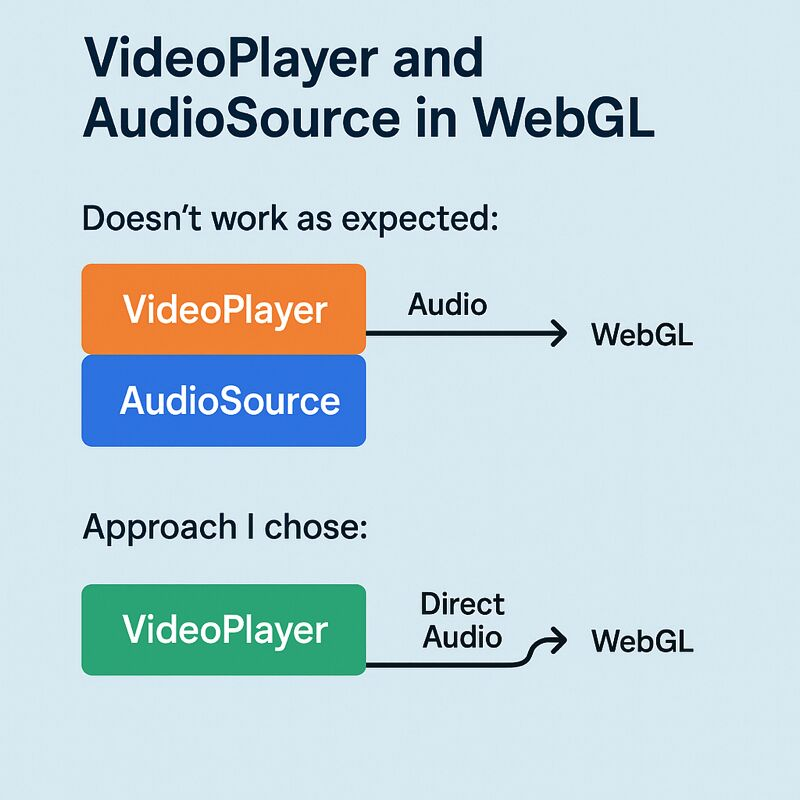
🔊 The Unexpected Issue
My setup was simple: A VideoPlayer feeding audio into an AudioSource, so I could use Unity’s AudioMixer to control volume, mute, and overall audio behavior.
- Works perfectly in the Editor.
- Works perfectly on mobile.
- Works perfectly on desktop.
But once I built to WebGL:
❌ Volume control didn’t work ❌ AudioSource settings were ignored ❌ Mixer routing had no effect ❌ The video always played at full volume
At first, I thought it was a bug in my architecture. Turns out… it wasn’t.
❗ Why It Happens
Unity’s documentation and issue tracker confirm that in WebGL, VideoPlayer audio doesn’t pass through the AudioSource pipeline the same way it does on other platforms.
WebGL imposes some browser-level constraints that essentially bypass the AudioSource when video audio is involved.
So even if your setup is correct, the result may not match what you see in the Editor.
✅ The Approach I Ended Up Using
Since WebGL wasn’t respecting the AudioSource, I switched strategies and went with:
1️⃣ Using Direct Audio Output
videoPlayer.audioOutputMode = VideoAudioOutputMode.Direct;2️⃣ Handling volume/mute through the VideoPlayer API
videoPlayer.SetDirectAudioVolume(0, volume);
videoPlayer.SetDirectAudioMute(0, muted);
3️⃣ Creating a small global controller
I built a lightweight manager (DontDestroyOnLoad) to act like a custom “video audio mixer” so I can keep consistent volume/mute behavior across scenes.
It’s not the only solution. It’s not necessarily the best for every project. But it worked reliably for my WebGL use case and respected the constraints of the platform.
🎯 Takeaway
If you’re working with videos in Unity WebGL, be aware that:
- AudioSource-based volume control might not behave as expected
- Browser audio limitations play a bigger role than in other platforms
- You may need to adjust your approach depending on your architecture
And if you run into the same issue I did, the VideoPlayer’s direct audio controls might be a good alternative to explore.
#Unity #WebGL